
Product detail
Click any product name (from Inventory, Reorder, or anywhere it's linked) to open its detail page — the full picture for one product, and where you fine-tune how it's planned and purchased.
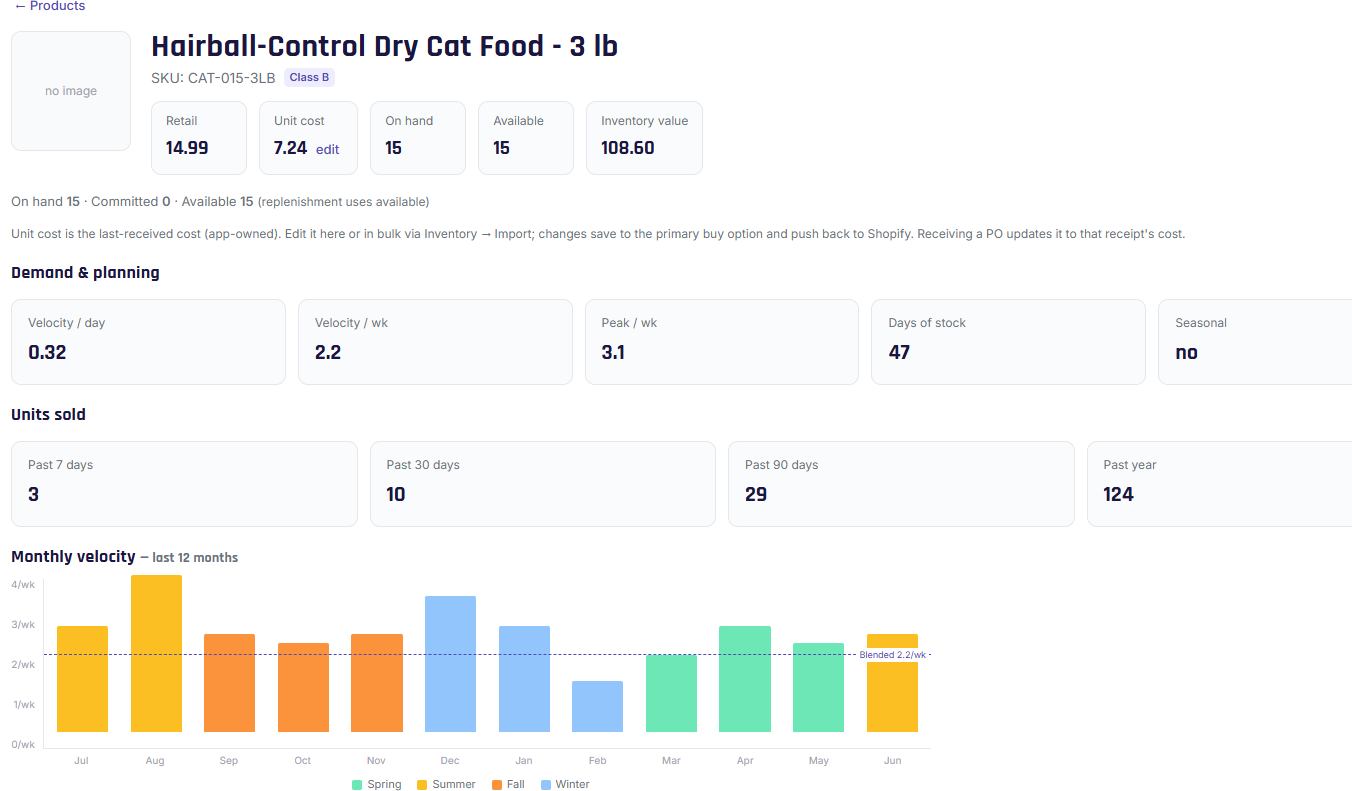
At the top
- Image, name, SKU, and ABC class badge.
Pricing & inventory
- Retail price (from Shopify).
- Unit cost — the last cost you received it at. You can edit it inline (Growth and up); the change saves and pushes back to Shopify's "Cost per item." Receiving a PO also updates this automatically.
- On hand, Available, and Inventory value (on hand × unit cost). If you have multiple locations, you'll also see the split by location.
Demand & planning
The sales picture Stockwik uses to plan: velocity per day / per week, peak, days of stock, whether the product is treated as seasonal, and units sold over the past 7 / 30 / 90 / 365 days. A small chart shows weekly sales over time.
Replenishment rules tab
Two cards show your reorder point (minimum) and order-up-to (maximum), including how each was calculated (or that it's pinned). Below, four fields let you override the math for this product:
- Minimum override and Maximum override — pin a fixed level.
- Days of cover and Safety-stock days — override the org defaults for this product.
Leave blank for "auto," or enter a number to pin. Click Save overrides. See Planning defaults & overrides.
Suppliers tab
The product's buy options — every way you purchase it (supplier, pack, cost, units per pack, MOQ, and which is primary). Add, edit, or delete options here. See Buy options.