
The Reorder page
The Reorder page is where Stockwik earns its keep: a live buy list that tells you what to order right now, how much, and from whom — grouped by supplier and ready to turn into purchase orders.
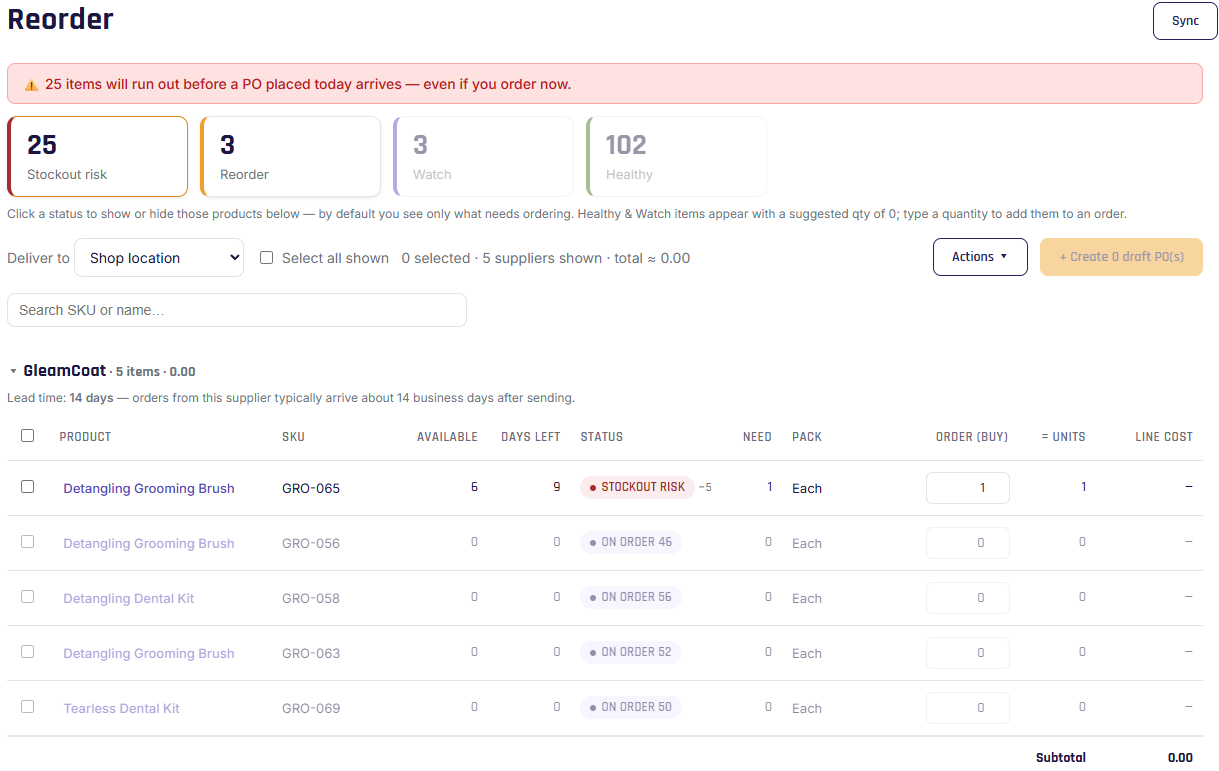
Status summary
At the top, four cards count your products by urgency:
- Stockout risk — will run out before a new order could arrive. Act now.
- Reorder — at or below the reorder point; time to order.
- Watch — approaching the reorder point; not urgent.
- Healthy — comfortably stocked.
A banner alerts you if anything is at stockout risk. (See how these are calculated.)
Controls
- Deliver to — where you want this order delivered (defaults to your default receiving location).
- Status toggles — by default the list shows the items that need action (stockout + reorder); click a card to also show Watch or Healthy.
- Search — filter by SKU or product name.
- Actions — export the current view or the full reorder list as CSV.
Grouped by supplier
Products are grouped under each supplier, with the supplier's lead time and a running subtotal for the items you've selected. Each row shows:
- Available and days left, plus the product's status (and an On order badge if units are already incoming).
- Need — the suggested quantity (see Understanding suggestions).
- Pack — the unit you order in (e.g. "Case of 12").
- Order (buy) — an editable field where you set how many packs to order.
- = units — the equivalent stock units, updating live as you type.
- Line cost — based on the buy option's cost.
Turning it into orders
Select the lines you want, then create draft purchase orders in one click — one per supplier. See Create POs from suggestions.